




 Apr 29, 2016, 05:39 PM
Last edit by: IB Advertising
See related guides and technical advice from our community experts:
- Camaro and Firebird How to Add AUX Input MP3 Player without Adapter<br>Step by step instructions for do-it-yourself repairs.

How you can add an aux input/mp3 player without an adapter

I just bought a DEH-P590IB Pioneer Premier CD Player and it comes with an iPod cable that plays and charges the iPod at the same time. I love it. Got it from ebay for a couple dollars over $150. Totally worth it, plus the sound quality has improved alot. Specially with the high and low pass filters.

Thread Starter
Launching!

Joined: Jan 2003
Posts: 254
Likes: 1
From: Rice Lake, WI
Soldering is best, but I think it will be okay without it. If you're worried you could put a big blog of hot glue across all the pins to things from possibly vibrating loose. You;ll cut two wires on the board and 4 of the wires from the jack will go to all the ends, and the last wire you can just strip a little off the middle and not actually cut if, the ground wire from the jack goes there

Staging Lane
Joined: Jun 2007
Posts: 57
Likes: 0
If I do try this I had an idea on mounting. Is it reasonable to think that I could put the auxiliary port in what is now the cigarette lighter, with some sort of spacer that would keep it in place. Would somewhere like the ashtray or the storage thing behind the shifter be better for this type of thing? I would want a way to hold it in place (atleast somewhat) so that if this were going to get disconnected it would be an easy reconnect.
Edit:
Is there a cable that is 1/8 in phone on one side and iPod charger port on the other? I do not want to have to fiddle with the volume when using my iPod in the car.
Edit:
Is there a cable that is 1/8 in phone on one side and iPod charger port on the other? I do not want to have to fiddle with the volume when using my iPod in the car.
Staging Lane
Joined: Jun 2007
Posts: 57
Likes: 0
Sorry about so many questions, but what do you mean when you say
"Pin 4 - Right Channel - wire coming from CD player module"
Would the wire coming from pin 4 then go to pin 3 on the connector or is that not what you mean?
"Pin 4 - Right Channel - wire coming from CD player module"
Would the wire coming from pin 4 then go to pin 3 on the connector or is that not what you mean?
Thread Starter
Launching!
Joined: Jan 2003
Posts: 254
Likes: 1
From: Rice Lake, WI
hi officer:
I don't know about a 96 HU, but I suspect it's the similar if it's a CD unit. The wiring may be different though. The way I found the correct wires was to probe the wires in the connector. The ground is easiest but it's usually different colored, or you can just ground to the case. I used a set of powered PC speakers, one wire on the ground, and then probed each pin looking for audio.
aliensRreal:
As to mounting, I wouldn't put it into the lighter socket. You can pretty much put it anywhere in the dash, I know people put it by the ash tray or the sunglass slot. Putting it into the ash tray it probably simple since you should be able to pop it out. I put one into the side of my console, on the passenger side. You can't see it from the driver's set but it's pretty easy to feel for it. I did it that way because I wanted to keep the mp3 player cable hidden and not see it going across the dash. I just put my player on the passenger seat. I pulled the entire console out to put it in, and I had to hit the inside a little with a dremel since the plastic is so thick the jack wouldn't stick through, so it takes some work to put it there.
Yes, all the of "pin" numbers, 1-5, are for the pins on the little radio shack jack. Each pin will run to one of the cut ends of the CD cable (2 wires, 4 ends, and you can just strip back the CD ground wire and tap into it without cutting it).
Of the cut wires, you have one end that's coming from the main circuit board, as shown in the picture showing left/right/ground, and the other end that goes into the CD player unit. In the case of Pin 4 (on the radio shack jack), that goes to right channel (3rd wire on the stereo circuit board) wire that is cut in two, it doesn't go to the half going to the circuit board, it goes to the end running out to CD player.
Maybe I can do a little diagram that makes this more clear
I don't know about a 96 HU, but I suspect it's the similar if it's a CD unit. The wiring may be different though. The way I found the correct wires was to probe the wires in the connector. The ground is easiest but it's usually different colored, or you can just ground to the case. I used a set of powered PC speakers, one wire on the ground, and then probed each pin looking for audio.
aliensRreal:
As to mounting, I wouldn't put it into the lighter socket. You can pretty much put it anywhere in the dash, I know people put it by the ash tray or the sunglass slot. Putting it into the ash tray it probably simple since you should be able to pop it out. I put one into the side of my console, on the passenger side. You can't see it from the driver's set but it's pretty easy to feel for it. I did it that way because I wanted to keep the mp3 player cable hidden and not see it going across the dash. I just put my player on the passenger seat. I pulled the entire console out to put it in, and I had to hit the inside a little with a dremel since the plastic is so thick the jack wouldn't stick through, so it takes some work to put it there.
Yes, all the of "pin" numbers, 1-5, are for the pins on the little radio shack jack. Each pin will run to one of the cut ends of the CD cable (2 wires, 4 ends, and you can just strip back the CD ground wire and tap into it without cutting it).
Of the cut wires, you have one end that's coming from the main circuit board, as shown in the picture showing left/right/ground, and the other end that goes into the CD player unit. In the case of Pin 4 (on the radio shack jack), that goes to right channel (3rd wire on the stereo circuit board) wire that is cut in two, it doesn't go to the half going to the circuit board, it goes to the end running out to CD player.
Maybe I can do a little diagram that makes this more clear
Last edited by Jason Novak; Aug 2, 2007 at 12:30 AM.
Staging Lane
Joined: Jun 2007
Posts: 57
Likes: 0
Thanks so much for your help Jason. I think I am understanding correctly now. One wire goes to the cut end that is connected to the main board and another wire goes to the end that leads to the cd player. Is this correct?
Also, how did you go about mounting it on the passenger side? I really do not want to have to take the whole center console area out in order to mount this thing, that might get too in depth for me. If I could put it in the center console that would work too, just run the cable out and to the iPod.
Also, how did you go about mounting it on the passenger side? I really do not want to have to take the whole center console area out in order to mount this thing, that might get too in depth for me. If I could put it in the center console that would work too, just run the cable out and to the iPod.
LS1 Tech Stories
The Best V8 Stories One Small Block at Time

Topdon ONE vs. Artidiag 800 BT2: Which is the Diagnostic Tablet For You?
Pouria Savadkouei
Gas Monkey Built a 6-Wheel Ferrari Testarossa With a Corvette LT4 Engine
Verdad Gallardo
7 Most Reliable High-Performance Engines GM Has Ever Built
Verdad Gallardo
Amazing '71 Camaro Restomod Is Modern Muscle Car Under the Skin
Verdad Gallardo
6 Common C5 Corvette Failures and What's Involved In Repairing Them
Pouria Savadkouei
Retro Modern Bandit Pontiac Trans AM Comes With Burt Reynolds' Autograph
Verdad Gallardo
Top 10 Greatest Cadillac V Series Performance Models Ever, Ranked
Pouria Savadkouei
Top 10 Most Powerful Chevy Trucks Ever Made!

Hennessey's New Supercharged Silverado ZR2 Has 700 HP
Verdad Gallardo
Thread Starter
Launching!
Joined: Jan 2003
Posts: 254
Likes: 1
From: Rice Lake, WI
FIREHAWK #07:
The jack is mounted someplace flush like your console, and any MP3 player or audio device with a standard 3.5mm connector can plug into it, you need a cable though like this:
http://www.monoprice.com/products/pr...ormat=2&style=
aliensRreal:
You are correct on the wiring. I took my console out to put the jack in. I don't think I would just drape the cable underneath it, that will be a log of wear and tear on the little jack connectors. The easiest place to mount it may be in the ash tray, since you can just pop it out, drill a whole in it big enough for the threaded connector to poke through (the little nut that holds it in place isn't very big, so it you make the hole too big it won't stay mounted and you'll need a washer or something). It should be easy to get the jack to the tray without taking everything apart. Here's a picture of where I mounted mine, if I did it again I'd move it an inch or two forward
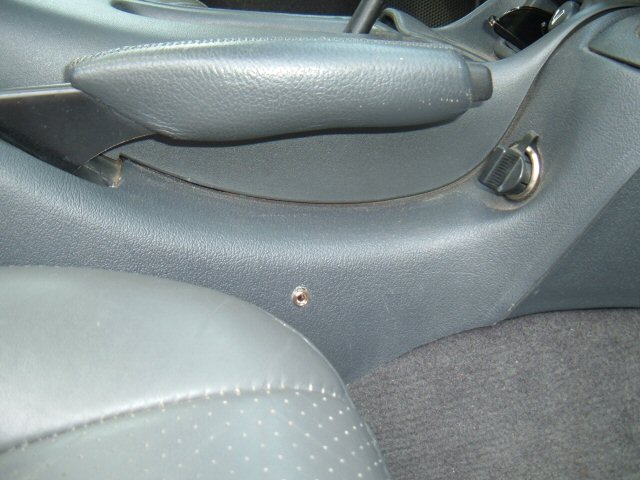
The jack is mounted someplace flush like your console, and any MP3 player or audio device with a standard 3.5mm connector can plug into it, you need a cable though like this:
http://www.monoprice.com/products/pr...ormat=2&style=
aliensRreal:
You are correct on the wiring. I took my console out to put the jack in. I don't think I would just drape the cable underneath it, that will be a log of wear and tear on the little jack connectors. The easiest place to mount it may be in the ash tray, since you can just pop it out, drill a whole in it big enough for the threaded connector to poke through (the little nut that holds it in place isn't very big, so it you make the hole too big it won't stay mounted and you'll need a washer or something). It should be easy to get the jack to the tray without taking everything apart. Here's a picture of where I mounted mine, if I did it again I'd move it an inch or two forward
thanks for the link.... Im gonna go ahead and order it from there.
Ive searched to see if anyone has done this to another stick head unit... since i have a 96 its not the exact one as you have.... Do you know if anyone has successfully done this to a HU like mine (stock 96 head unit).....???
also as of yesterday i put in a burned CD and it didnt like too much so now it says ERR 20 (i believe) anything i can do to fix this.....
Ive searched to see if anyone has done this to another stick head unit... since i have a 96 its not the exact one as you have.... Do you know if anyone has successfully done this to a HU like mine (stock 96 head unit).....???
also as of yesterday i put in a burned CD and it didnt like too much so now it says ERR 20 (i believe) anything i can do to fix this.....
Thread Starter
Launching!
Joined: Jan 2003
Posts: 254
Likes: 1
From: Rice Lake, WI
You should be able to pick up the cable at walmart, though I won't be surprised if monoprice is still cheaper after shipping. They're great for all cables and switchers, especially HDMI cables for $4-$5 vs $30-$100 other places, and just as good.
Anyway, I don't know anything other then 98-2002 stereos, as long as the CD player is a separate module you be able to add in a jack. I suspect the wiring is similar, though you can probe them like I did to test.
One issue, in order for it to pass audio from the mp3 player a CD must be playing. My 98 plays CDR's, thought it doesn't play CDRW's. I don't know if this is a recent issue you've had and it worked fine before (try another brand of disc?) but you need to be able to play a disc.
Anyway, I don't know anything other then 98-2002 stereos, as long as the CD player is a separate module you be able to add in a jack. I suspect the wiring is similar, though you can probe them like I did to test.
One issue, in order for it to pass audio from the mp3 player a CD must be playing. My 98 plays CDR's, thought it doesn't play CDRW's. I don't know if this is a recent issue you've had and it worked fine before (try another brand of disc?) but you need to be able to play a disc.
I've bought all the parts at my local radioshack and i just finished opening up my head unit and this is what I found...
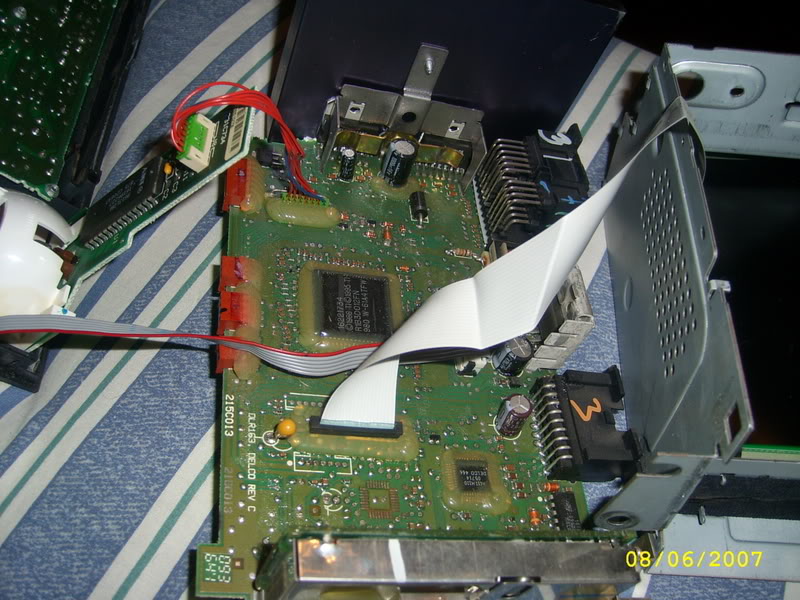
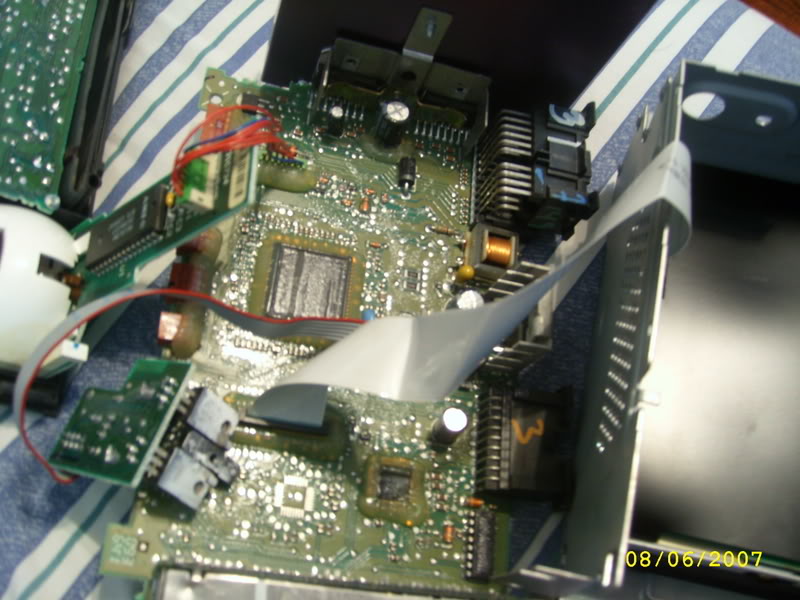
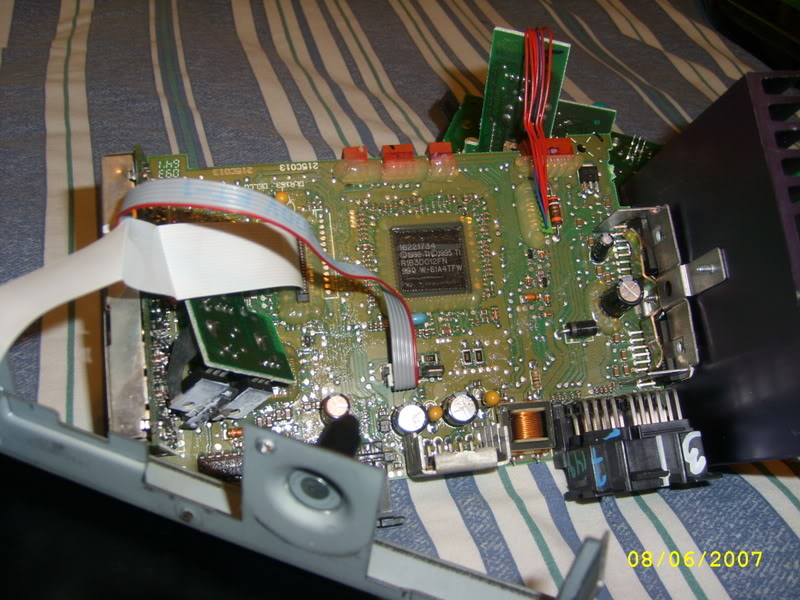
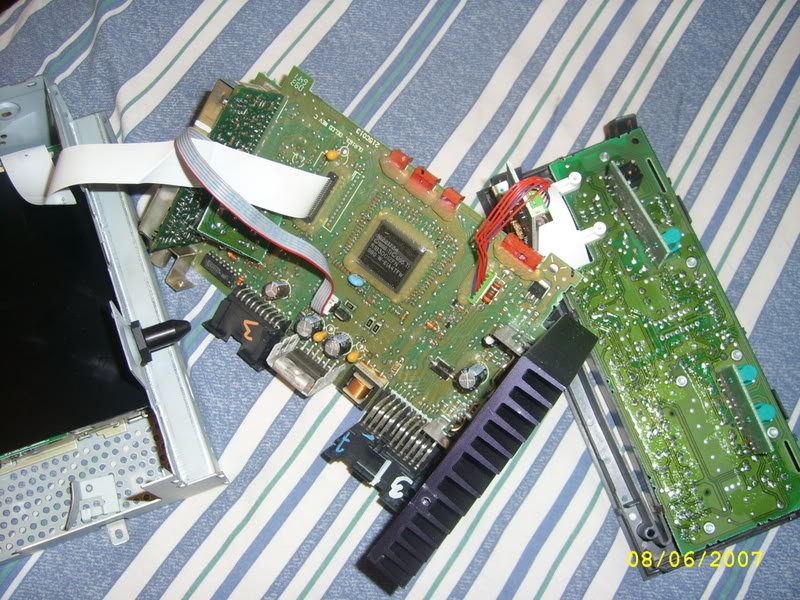
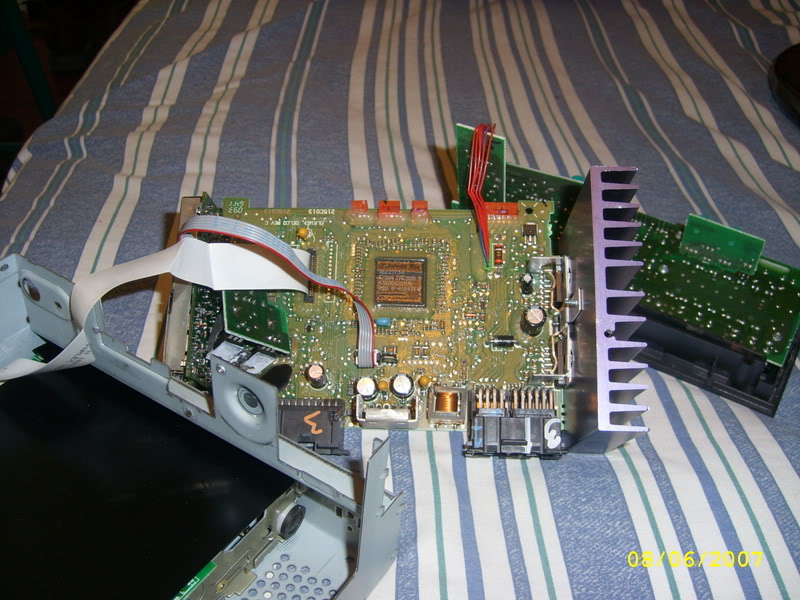
The ribbon cable on my HU is not like yours.... I dont think that i can tap into mine, like you did on yours. Does this mean that i can not do it...???
The ribbon cable on my HU is not like yours.... I dont think that i can tap into mine, like you did on yours. Does this mean that i can not do it...???
Thread Starter
Launching!
Joined: Jan 2003
Posts: 254
Likes: 1
From: Rice Lake, WI
I know pontiac and chevy units are a little different, but I know on 98+ they both use the same cable types.
Is the ribbon cable completely flat with the wires flat, ie printed on it, or are there real round wires running through it?
If it's flat, it will be difficult to splice into. What I would do is cut out a little square on left/right channels to disconnect them, and then hook the 3.5mm jack wires directly to the ends of ribbon cable instead of the middle/cuts. Since I can see the contacts on the circuit board for the CD connector, wedge them in/solder if needed, and do the same thing on the CD module. If you can't do it on the connector side, if you can get the bottom of the board you can probably see where all the pins are sticking through slightly and soldered down, and you can solder to them. For the ground I would just run it to metal case instead of splicing it in, there looks like a couple of good places you can make a good connection. Just make sure you verify which wires carry sound, since it will be more difficult to fix if you cut the wrong ones.
Is the ribbon cable completely flat with the wires flat, ie printed on it, or are there real round wires running through it?
If it's flat, it will be difficult to splice into. What I would do is cut out a little square on left/right channels to disconnect them, and then hook the 3.5mm jack wires directly to the ends of ribbon cable instead of the middle/cuts. Since I can see the contacts on the circuit board for the CD connector, wedge them in/solder if needed, and do the same thing on the CD module. If you can't do it on the connector side, if you can get the bottom of the board you can probably see where all the pins are sticking through slightly and soldered down, and you can solder to them. For the ground I would just run it to metal case instead of splicing it in, there looks like a couple of good places you can make a good connection. Just make sure you verify which wires carry sound, since it will be more difficult to fix if you cut the wrong ones.
Originally Posted by Jason Novak
I know pontiac and chevy units are a little different, but I know on 98+ they both use the same cable types.
Is the ribbon cable completely flat with the wires flat, ie printed on it, or are there real round wires running through it?
If it's flat, it will be difficult to splice into. What I would do is cut out a little square on left/right channels to disconnect them, and then hook the 3.5mm jack wires directly to the ends of ribbon cable instead of the middle/cuts. Since I can see the contacts on the circuit board for the CD connector, wedge them in/solder if needed, and do the same thing on the CD module. If you can't do it on the connector side, if you can get the bottom of the board you can probably see where all the pins are sticking through slightly and soldered down, and you can solder to them. For the ground I would just run it to metal case instead of splicing it in, there looks like a couple of good places you can make a good connection. Just make sure you verify which wires carry sound, since it will be more difficult to fix if you cut the wrong ones.
Is the ribbon cable completely flat with the wires flat, ie printed on it, or are there real round wires running through it?
If it's flat, it will be difficult to splice into. What I would do is cut out a little square on left/right channels to disconnect them, and then hook the 3.5mm jack wires directly to the ends of ribbon cable instead of the middle/cuts. Since I can see the contacts on the circuit board for the CD connector, wedge them in/solder if needed, and do the same thing on the CD module. If you can't do it on the connector side, if you can get the bottom of the board you can probably see where all the pins are sticking through slightly and soldered down, and you can solder to them. For the ground I would just run it to metal case instead of splicing it in, there looks like a couple of good places you can make a good connection. Just make sure you verify which wires carry sound, since it will be more difficult to fix if you cut the wrong ones.
just to clarify..... This is my CD connection correct????
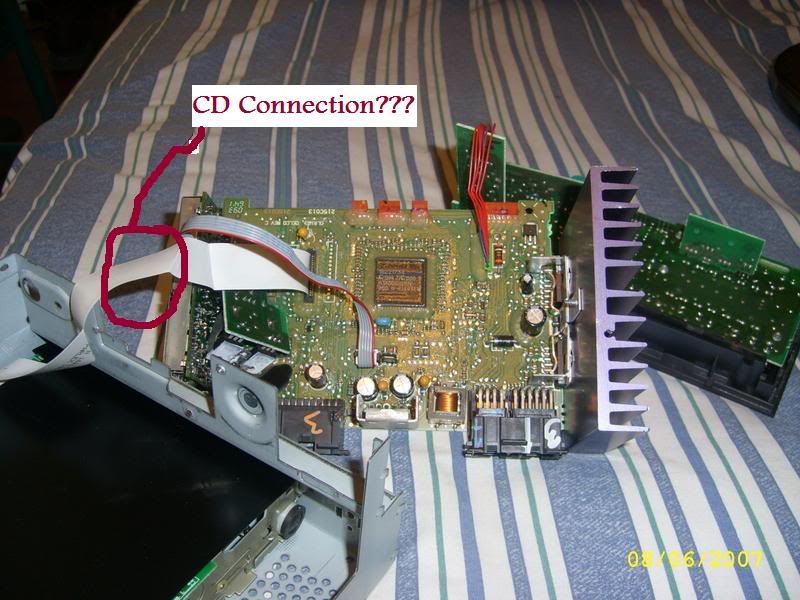
If thats the case, it is not like yours; They are not round wires, they are completely flat and very thin....
How exactly did you verify which ones carry sound?? Did you just make a small splice and hook up speakers to the each one, while it was connected to the harness on the car????
Thread Starter
Launching!
Joined: Jan 2003
Posts: 254
Likes: 1
From: Rice Lake, WI
That looks like the CD connector. I think it can still be done, but it will be more difficult since you can't slice into it directly. I had a stereo connector and hooked into a 12v power supply, you may need to run it off the car's connector. I made a probe by cutting off the end from an old set of headphones, and hooking the left/right channels together, and the left/right grounds together, and then each to a paper clip, plugged it into a female/female adapter, and then into a set of speakers. You could also just cut off the end of some headphones and probe using the headphone ends, just be careful because you can get some really loud tones. Put the ground probe onto the metal case of the stereo, and then tap each pin looking for sound
thanks for all the info... Guess i'll have to do this on one of my days off, I didnt notice how small the wires, and the phone jack connector were until I had them infront of me.... I'll more than likely have more questions, that you can answer when i decide to tackle this project on the weekend... Thanks once again.....
my HU did not want to play CD's so one of my buds gave me an extra Monsoon he had and i just finished the install... I just connected everything back together and it works well. Since it got dark i havent hid all the wires etc... but i'll finish that off tomorrow. Nice lil project....